

General
General Settings
The General settings allow administrators to manage the organization name and regional preferences used across the application.
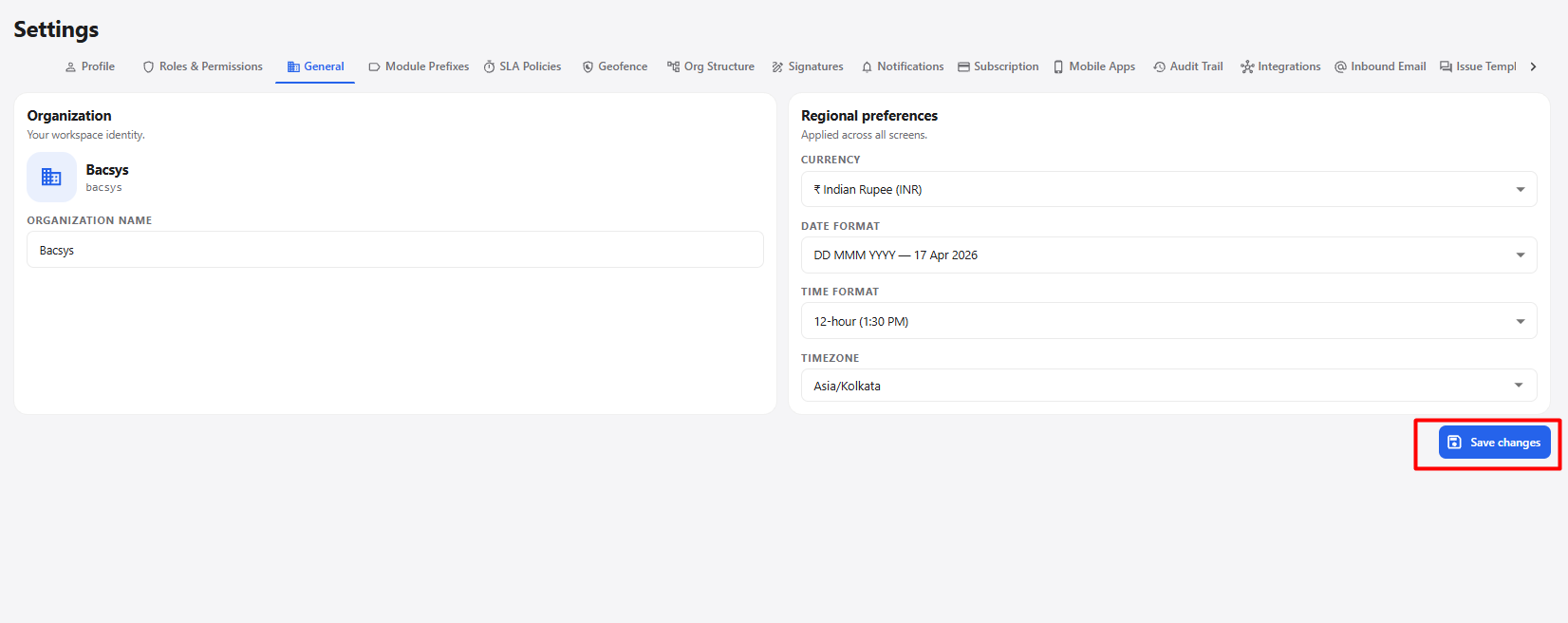
General Settings
| Section | Field / Option | Description |
|---|---|---|
| Organization | Organization Name | Displays the name of the organization and allows it to be updated. |
| Regional Preferences | Currency | Select the currency used throughout the application. |
| Regional Preferences | Date Format | Select the format in which dates are displayed across the application. |
| Regional Preferences | Time Format | Select whether time is displayed in 12-hour or other available formats. |
| Regional Preferences | Timezone | Select the timezone used by the application for dates and times. |
| Action | Save changes | Saves the updated organization and regional preference settings. |
Available Regional Settings
| Setting | Example |
|---|---|
| Currency | Indian Rupee (INR) |
| Date Format | DD MMM YYYY |
| Time Format | 12-hour (1:30 PM) |
| Timezone | Asia/Kolkata |
General Settings Workflow
Open Settings
      ↓
Select General
      ↓
Update Organization Name
      ↓
Select Currency
      ↓
Select Date Format
      ↓
Select Time Format
      ↓
Select Timezone
      ↓
Click Save changes
      ↓
General Settings Updated