

BACSYS Edge Platform Overview
The BACSYS Edge Platform operates on two key precepts:
Core Services
The core services encompass various modular engines that run as a single service by default after installation. You have the capability to start/stop these services using SSH commands. The following modules are integral parts of the core services:
- Protocol Stack
- Alarms & Trends
- Displays & Dashboards
- Rule Builder & Engine
- Scheduler
- Platform Settings
Web Interface
The platform provides a secured web interface where you can access and perform functions across various modules in the platform. The web interface follows a standard layout structure:
- Navigation Menu: Contains links to different sections and modules of the platform.
- Dashboard: Provides an overview and summary of key metrics, alarms, and trends.
- Modules: Each module (Protocol Stack, Alarms & Trends, Displays & Dashboards, Rule Builder & Engine, Scheduler, Platform Settings) has its dedicated section for configuration and management.
- User Settings: Allows you to customize their preferences, manage accounts, and adjust security settings.
This structured layout ensures ease of navigation and efficient utilization of the platform's functionalities.
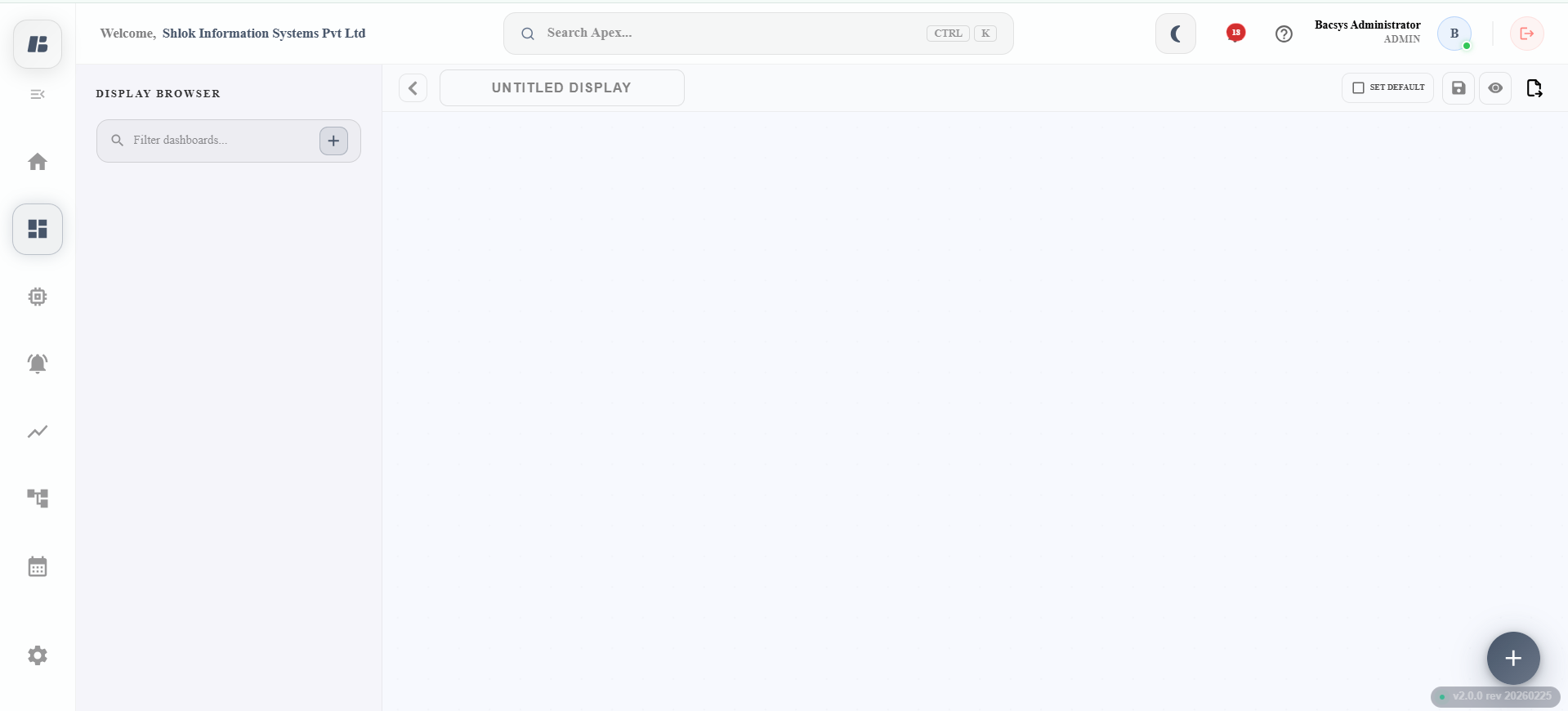
Understanding the Interface
Title Pane
The Title Pane shows the platform's logo, details of the logged-in user, user profile, and a logout button. It remains mostly fixed and doesn't change much with customization.
Navigation Pane
The Navigation Pane displays the main modules of the product:
- Home: Provides a summary dashboard of hardware performance, network and device statistics, alarm statistics and configuration statistics.
- Displays: Allows user to create and configure customized dashboards using pre-built widgets.
- Devices: Allows user to manage devices, including creating, monitoring, and controlling networks, devices, and objects connected to the edge platform. It also includes configurations for alarms and trends.
- Alarms: Lets user manage alarms on the edge platform, such as viewing, acknowledging alarms from devices and objects.
- Trends: Enables user to manage trends on the edge platform with graphical charts, tabular views, data export, and comparison of multiple trends.
- Rules: Allows user to create and manage rules on the edge platform, from simple to complex engineering logics for Building Automation and Control Systems.
- Schedules: Lets user to create and manage schedules on the edge platform, allowing user to schedule operations based on a weekly calendar.
- Settings: Allows user to customize and configure various aspects of the application according to your preferences.
Browser Pane
The Browser Pane is a submenu for the modules on the Navigation Pane. It includes lists such as 'List of Displays,' 'Network Tree View of Devices & Objects,' 'List of Trend Objects,' 'List of Rules,' and 'List of Schedules.'
Canvas Pane
The Canvas Pane is a configuration area for specific modules, allowing you to drag and drop modules from the Widget Panes.
Widgets Pane
The Widgets Pane is a list of pre-built functional blocks available for the modules area. You can drag and drop modules onto the Canvas Pane and configure them to meet the requirements of their job or project.