

License Management
The License Management module provides information about the system license, software maintenance status, and device identity. It allows users to view license details, verify the software maintenance agreement (SMA), and access the privacy policy.
Using this module, you can:
- View the current license status.
- View the device instance fingerprint.
- View the license topology.
- View the license authorization date.
- View the cryptographic key.
- Monitor the Software Maintenance Agreement (SMA) status.
- View the SMA expiry date and renewal information.
- Access the privacy policy.
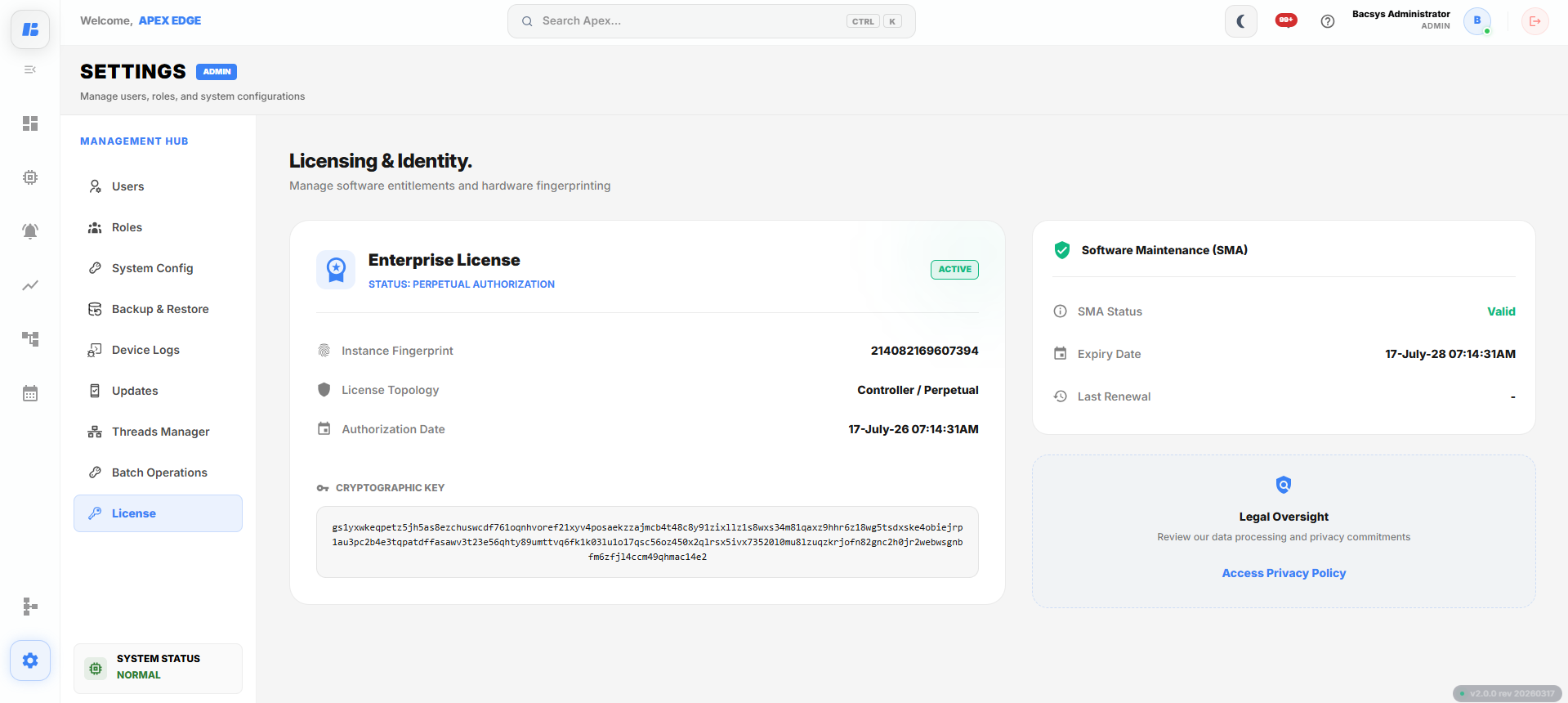
License Management
Enterprise License
The Enterprise License section displays information about the installed license and device identity.
The following information is available:
| Field | Description |
|---|---|
| License Status | Displays the current license status of the controller (for example, Active or Inactive). |
| Authorization Type | Displays the type of license authorization, such as Perpetual Authorization. |
| Instance Fingerprint | Displays the unique hardware fingerprint used for license identification. |
| License Topology | Displays the type of licensed deployment. |
| Authorization Date | Displays the date and time when the license was authorized. |
| Cryptographic Key | Displays the encrypted license key associated with the controller. |
The Enterprise License section allows users to verify the licensing information of the controller.
Software Maintenance (SMA)
The Software Maintenance (SMA) section displays the maintenance status of the installed license.
The following information is available:
| Field | Description |
|---|---|
| SMA Status | Displays the current status of the Software Maintenance Agreement. |
| Expiry Date | Displays the date and time when the Software Maintenance Agreement expires. |
| Last Renewal | Displays the most recent Software Maintenance Agreement renewal date. |
The SMA information helps users verify whether software maintenance is currently active.
Legal Oversight
The Legal Oversight section provides access to the product privacy policy.
To view the privacy policy:
- Click Access Privacy Policy.
The privacy policy opens in the default web browser.
Complete Workflow
View license information by following the workflow below:
- Open Settings.
- Select License.
- Review the Enterprise License information.
- Verify the License Status.
- Review the Instance Fingerprint.
- Verify the License Topology.
- Review the Authorization Date.
- View the Cryptographic Key.
- Review the Software Maintenance (SMA) status.
- Verify the Expiry Date and Last Renewal information.
- Click Access Privacy Policy to view the privacy policy, if required.
The license information, maintenance status, and device identity are displayed successfully.