

Mail Configuration
The Mail Configuration section allows users to configure email notifications for alarms and system events. Users can specify the recipient email address, configure the SMTP server settings, enable or disable email notifications, and send a test email to verify the configuration.
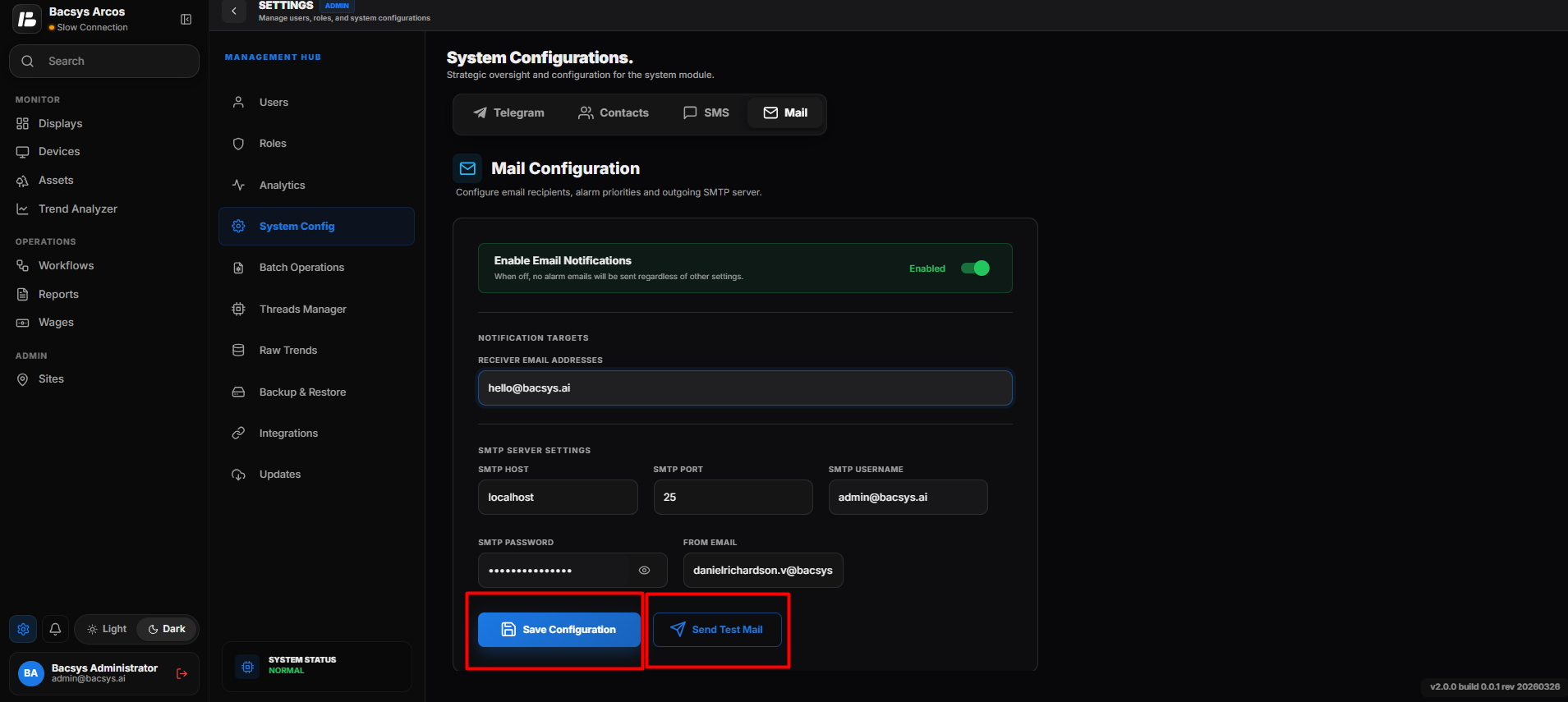
Mail Configuration
Accessing Mail Configuration
Steps
- Navigate to Settings.
- Select Mail from the System Configurations page.
- The Mail Configuration page opens.
Configuring Mail Notifications
The following settings are available for configuring email notifications.
| Field | Description |
|---|---|
| Enable Email Notifications | Enable or disable email notifications for alarms and system events. |
| Receiver Email Address | Enter the email address that will receive alarm and system notifications. |
| SMTP Host | Enter the SMTP server hostname or IP address. |
| SMTP Port | Enter the SMTP server port number. |
| SMTP Username | Enter the username used to authenticate with the SMTP server. |
| SMTP Password | Enter the password associated with the SMTP account. |
| From Email | Specify the sender email address that appears in the outgoing notifications. |
| Save Configuration | Saves the configured mail settings and applies them to the system. |
| Send Test Mail | Sends a test email to verify that the mail configuration is working correctly. |
Saving the Mail Configuration
Steps
- Enable Email Notifications if required.
- Enter the Receiver Email Address.
- Configure the SMTP Host.
- Enter the SMTP Port.
- Enter the SMTP Username.
- Enter the SMTP Password.
- Specify the From Email address.
- Click Save Configuration.
The mail configuration is saved successfully.
Sending a Test Mail
After saving the configuration, users can verify the settings by sending a test email.
Steps
- Verify that all mail settings are configured correctly.
- Click Send Test Mail.
- The system sends a test email to the configured receiver email address.
- Verify that the email is received successfully.
Note
- Ensure that the SMTP server details are correct before saving the configuration.
- An active internet connection is required to send email notifications.
- Email notifications are sent only when Enable Email Notifications is enabled.
- The Send Test Mail option helps verify the SMTP configuration before using it for alarm notifications.