

Telegram Configuration
The Telegram Configuration feature allows users to configure Telegram notifications for alarms and system events. Users can specify the Telegram Chat ID, configure retry settings, enable or disable notifications, and save the configuration to receive alerts through Telegram.
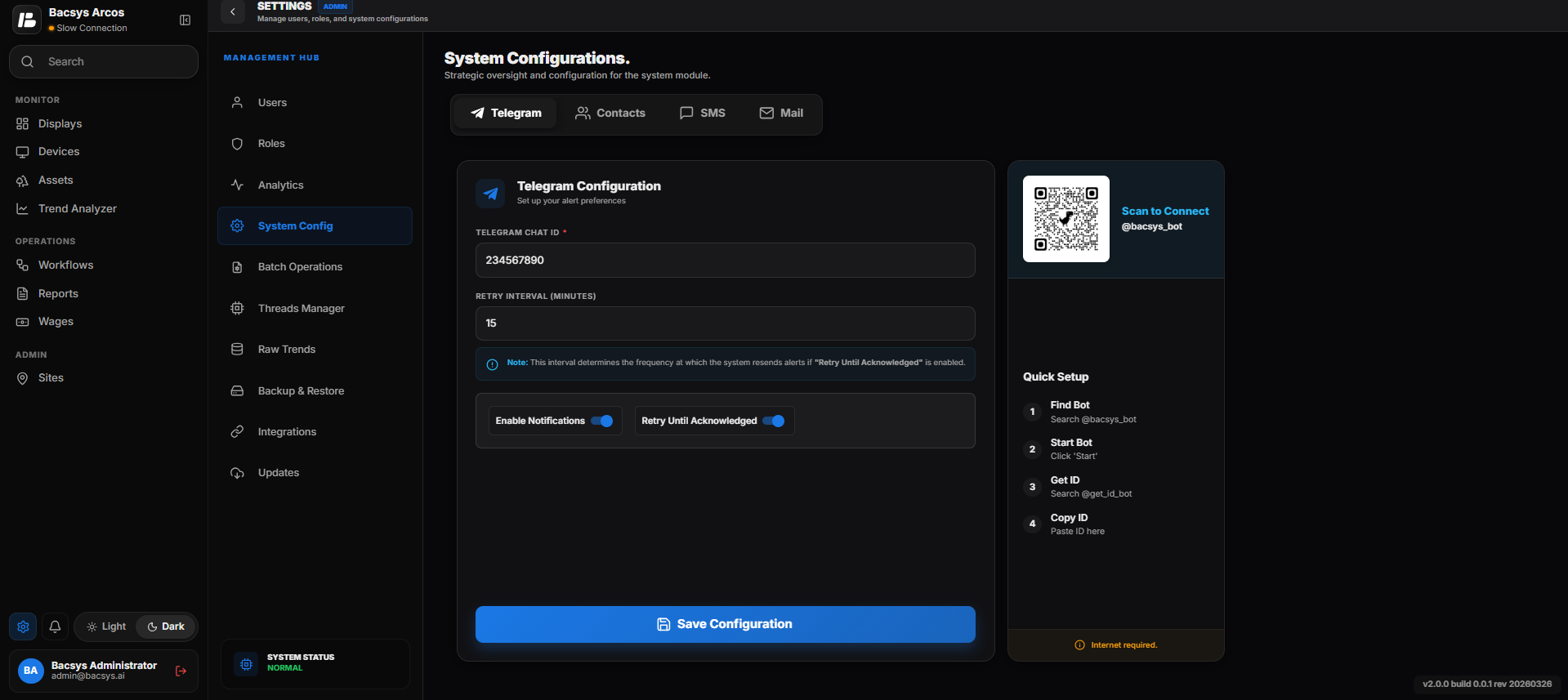
Telegram Configuration
Accessing Telegram Configuration
Steps
- Navigate to Settings.
- Select Telegram Configuration.
- The Telegram Configuration page opens.
Configuring Telegram Notifications
The following settings are available to configure Telegram notifications.
| Field | Description |
|---|---|
| Telegram Chat ID | Enter the Telegram Chat ID where alarm and system notifications should be delivered. |
| Retry Interval (Minutes) | Specify the time interval, in minutes, between notification retry attempts when Retry Until Acknowledged is enabled. |
| Enable Notifications | Enable or disable Telegram notifications for alarms and events. |
| Retry Until Acknowledged | When enabled, the system continues sending notifications at the configured retry interval until the alarm is acknowledged. |
| Save Configuration | Saves the configured Telegram settings and applies them to the system. |
Quick Setup
The Quick Setup panel provides the steps required to connect the Bacsys Telegram Bot.
Steps
- Open the Telegram application.
- Search for the @bacsys_bot Telegram bot.
- Open the bot and click Start.
- Search for @get_id_bot.
- Start the bot to obtain your Telegram Chat ID.
- Copy the displayed Chat ID.
- Paste the Chat ID into the Telegram Chat ID field.
- Configure the required notification settings.
- Click Save Configuration.
QR Code
The QR code displayed in the Telegram Configuration page provides quick access to the @bacsys_bot.
Steps
- Open the camera or QR scanner on your mobile device.
- Scan the QR code displayed on the page.
- The @bacsys_bot opens in the Telegram application.
- Click Start to begin interacting with the bot.
Saving the Configuration
After entering all the required information, save the configuration.
Steps
- Verify the Telegram Chat ID.
- Configure the Retry Interval.
- Enable or disable Notifications as required.
- Enable or disable Retry Until Acknowledged if required.
- Click Save Configuration.
The Telegram configuration is saved successfully.
Note
- Ensure that the Telegram Chat ID is valid before saving the configuration.
- The Retry Interval is used only when Retry Until Acknowledged is enabled.
- An active internet connection is required to send Telegram notifications.
- Notifications are delivered only when Enable Notifications is turned on.