

Meter Mapping Configuration
The Meter Mapping Configuration section is used to configure the keywords that the system uses to automatically discover and map meter-related points....
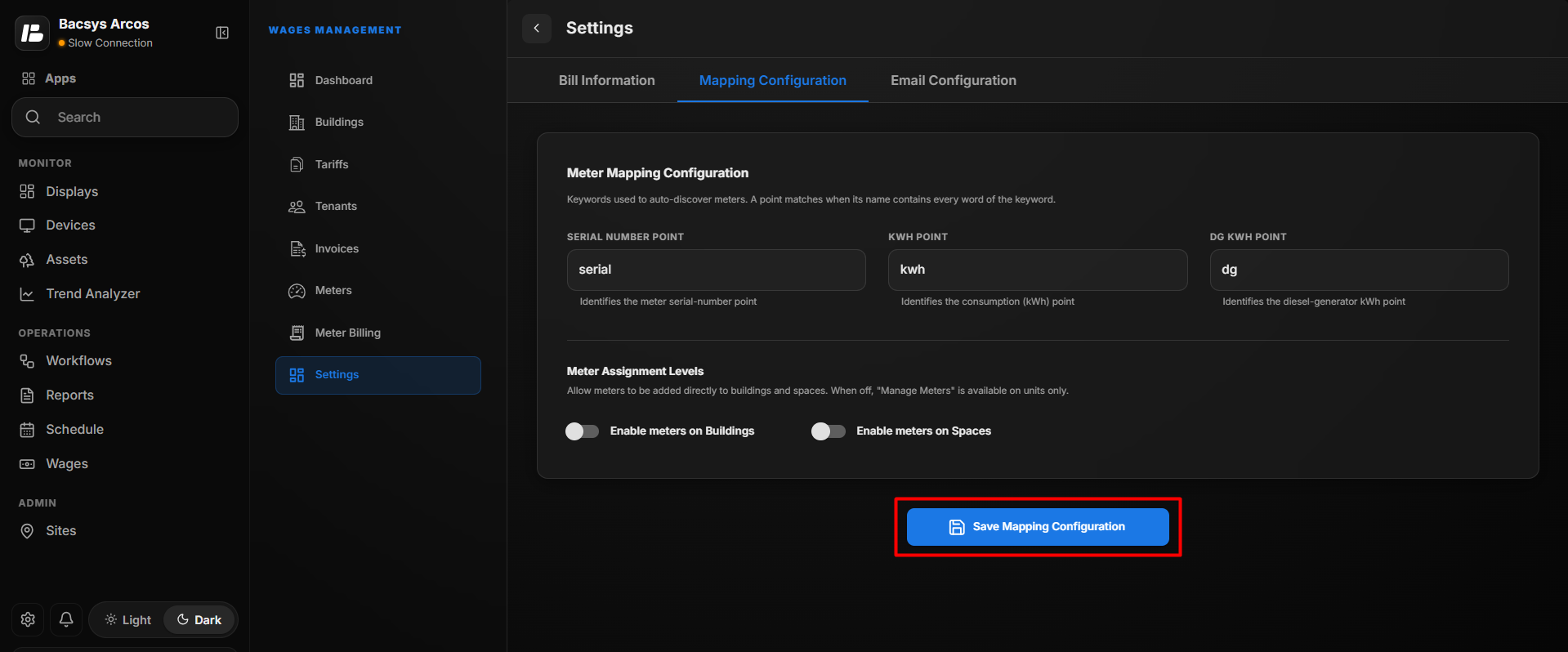
The Meter Mapping Configuration section is used to configure the keywords that the system uses to automatically discover and map meter-related points. It also allows users to control whether meters can be assigned directly to Buildings and Spaces.
Configure Meter Mapping
Enter the required information in the Meter Mapping Configuration section.
| Field | Description |
|---|---|
| Serial Number Point | Enter the keyword used to identify the point that contains the meter serial number. |
| KWH Point | Enter the keyword used to identify the point that contains the electricity consumption value in kWh. |
| DG KWH Point | Enter the keyword used to identify the Diesel Generator (DG) kWh consumption point. |
| Enable meters on Buildings | Enable this option to allow meters to be assigned directly to buildings. |
| Enable meters on Spaces | Enable this option to allow meters to be assigned directly to spaces. |
Note
- The system uses the configured keywords to automatically discover meter points.
- A point matches when its name contains every word configured in the corresponding keyword.
- Serial Number Point is used to identify the meter's serial-number point.
- KWH Point is used to identify the meter's electricity consumption point.
- DG KWH Point is used to identify the diesel-generator consumption point.
- When Enable meters on Buildings or Enable meters on Spaces is disabled, meter assignment is restricted according to the configured assignment levels.
Meter Assignment Levels
The Meter Assignment Levels section controls where meters can be assigned within the site hierarchy.
Enable Meters on Buildings
Enable Enable meters on Buildings to allow users to add and manage meters directly at the Building level.
Enable Meters on Spaces
Enable Enable meters on Spaces to allow users to add and manage meters directly at the Space level.
When these options are disabled, meter management is available only at the applicable lower hierarchy level, such as Units.
Save Mapping Configuration
- Enter the required Serial Number Point keyword.
- Enter the KWH Point keyword.
- Enter the DG KWH Point keyword, if required.
- Enable or disable Enable meters on Buildings according to the required configuration.
- Enable or disable Enable meters on Spaces according to the required configuration.
- Review the configured mapping settings.
- Click Save Mapping Configuration to save the changes.