

Email SMTP Configuration - V2
Email SMTP Configuration
The Email SMTP Configuration module allows users to configure an SMTP server for sending email notifications when alarms or system events occur.
Using this module, you can:
- Enable or disable email notifications.
- Configure recipient email addresses.
- Configure the SMTP server details.
- Configure the SMTP authentication credentials.
- Save the email configuration.
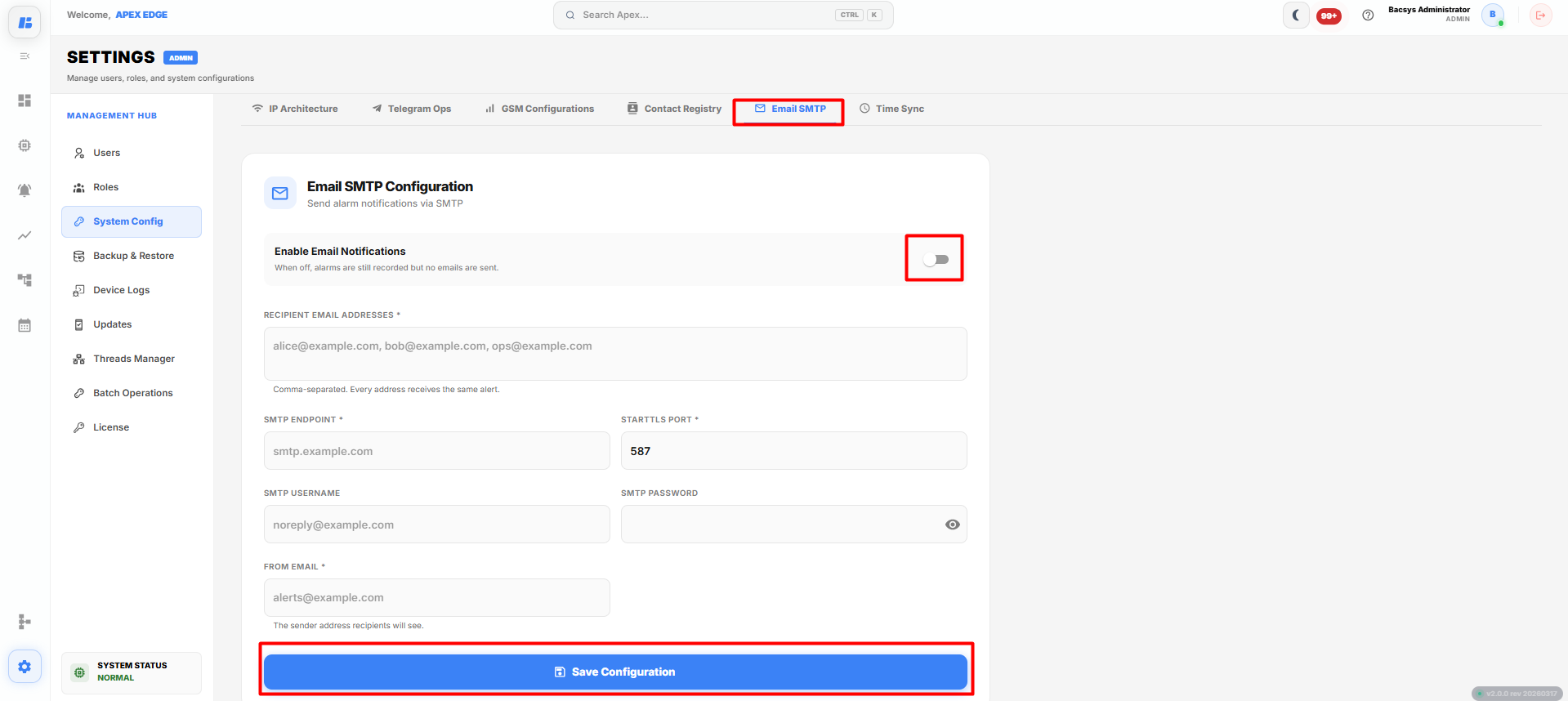
Email SMTP Configuration
Configuring Email SMTP
To configure email notifications:
- Open the System Configurations module.
- Select Email SMTP.
- Enable Email Notifications, if required.
- Enter the required SMTP configuration details.
- Click Save Configuration.
The following configuration options are available:
| Field | Description |
|---|---|
| Enable Email Notifications | Enables or disables email notifications. When disabled, alarms are still recorded but email notifications are not sent. |
| Recipient Email Addresses | Specifies one or more email addresses that will receive alarm notifications. Separate multiple email addresses with commas. |
| SMTP Endpoint | Specifies the SMTP server address used to send emails. |
| STARTTLS Port | Specifies the SMTP port used for secure STARTTLS communication (for example, 587). |
| SMTP Username | Specifies the username used to authenticate with the SMTP server. |
| SMTP Password | Specifies the password associated with the SMTP account. |
| From Email | Specifies the email address displayed as the sender of the notification emails. |
| Save Configuration | Saves the configured SMTP settings. |
Note: All recipient email addresses receive the same notification. Multiple email addresses must be separated using commas.
Email Notifications
To enable email notifications:
- Turn on the Enable Email Notifications toggle.
- Enter one or more recipient email addresses.
- Configure the SMTP server details.
- Enter the SMTP authentication credentials.
- Specify the From Email address.
- Click Save Configuration.
Once the configuration is saved, the system sends email notifications to the configured recipients whenever an alarm or event is triggered.
Complete Workflow
Configure Email SMTP by following the workflow below:
- Open Settings.
- Select System Configurations.
- Open the Email SMTP tab.
- Enable Email Notifications.
- Enter the Recipient Email Addresses.
- Enter the SMTP Endpoint.
- Specify the STARTTLS Port.
- Enter the SMTP Username.
- Enter the SMTP Password.
- Specify the From Email address.
- Click Save Configuration.
The Email SMTP configuration is saved successfully, and the system sends email notifications to the configured recipients whenever the configured events or alarms occur.