

Time Sync - V2
Time Sync
The Time Sync module allows users to view the browser time, monitor the device system time, synchronize the device clock with the browser time, and automatically synchronize the device time using MQTT.
Using the Time Sync module, you can:
- View the current browser date, time, and time zone.
- View the current device system date, time, and time zone.
- Refresh the displayed device time.
- Synchronize the device time with the browser time.
- Configure automatic time synchronization using MQTT.
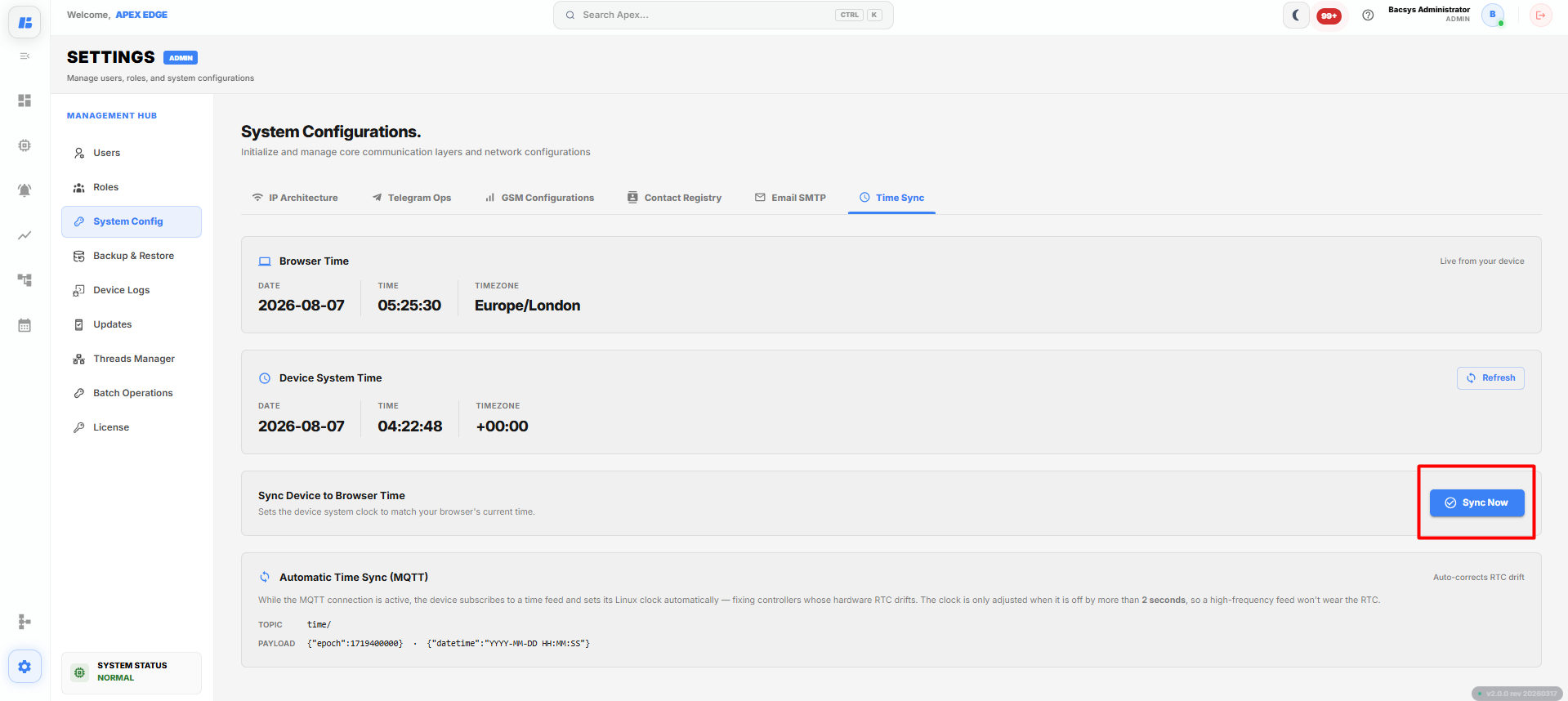
Time Sync Configuration
Browser Time
The Browser Time section displays the current date, time, and time zone of the computer or browser being used to access the application.
The following information is displayed:
| Field | Description |
|---|---|
| Date | Displays the current browser date. |
| Time | Displays the current browser time. |
| Time Zone | Displays the browser's current time zone. |
The browser time is automatically detected from the client device.
Device System Time
The Device System Time section displays the current date, time, and time zone configured on the controller.
The following information is displayed:
| Field | Description |
|---|---|
| Date | Displays the current device system date. |
| Time | Displays the current device system time. |
| Time Zone | Displays the configured device time zone. |
| Refresh | Retrieves and displays the latest device system time. |
To update the displayed device time:
- Click Refresh.
The latest system time is retrieved from the device.
Sync Device to Browser Time
The Sync Device to Browser Time option updates the controller's system clock to match the browser's current date and time.
To synchronize the device time:
- Verify the displayed Browser Time.
- Click Sync Now.
The device system time is updated to match the browser time.
Automatic Time Sync (MQTT)
The Automatic Time Sync (MQTT) section automatically synchronizes the device time using MQTT whenever an MQTT connection is available.
The following information is displayed:
| Field | Description |
|---|---|
| Topic | Displays the MQTT topic used for time synchronization. |
| Payload | Displays the JSON payload format used to update the device time. |
When MQTT time synchronization is enabled:
- The device subscribes to the configured MQTT time topic.
- The system automatically updates the device clock whenever a valid time message is received.
- The Real-Time Clock (RTC) is adjusted only when the time difference exceeds the configured threshold, preventing unnecessary RTC updates.
Complete Workflow
Synchronize the device time by following the workflow below:
- Open Settings.
- Select System Configurations.
- Open the Time Sync tab.
- Review the Browser Time.
- Review the Device System Time.
- Click Refresh to retrieve the latest device time.
- Click Sync Now to synchronize the device time with the browser time.
- Verify the updated device time.
- Review the Automatic Time Sync (MQTT) topic and payload for automatic synchronization.
The device time is successfully synchronized and remains up to date through manual synchronization or automatic MQTT time synchronization.