

GSM Configuration - V2
GSM Configuration
The GSM Configuration module allows users to configure the GSM modem for internet connectivity and SMS notifications. It provides two configuration tabs:
- Internet Configuration
- SMS Configuration
Internet Configuration
The Internet Configuration tab is used to configure the SIM card settings required for mobile internet connectivity.
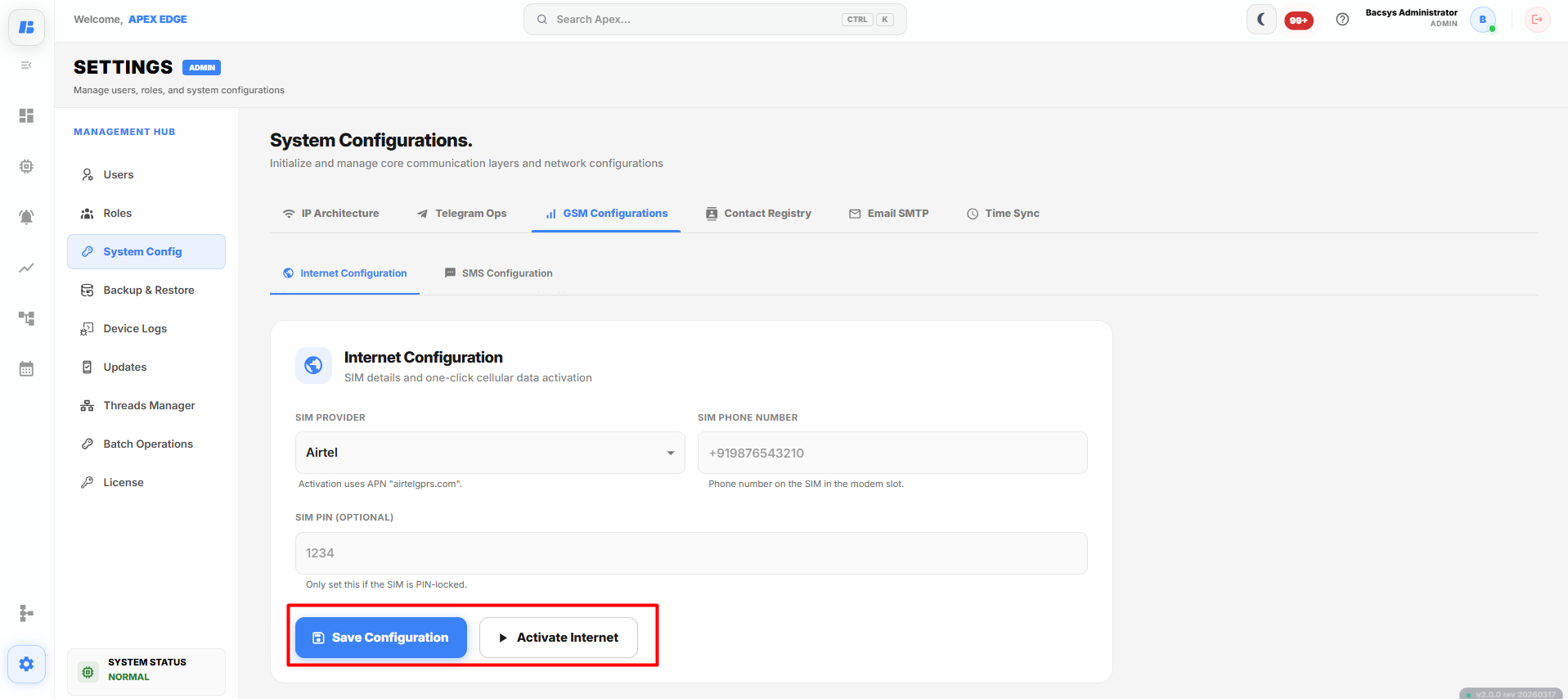
To configure the Internet settings:
- Open the System Configurations module.
- Select GSM Configurations.
- Open the Internet Configuration tab.
- Select the required SIM Provider.
- Verify or enter the SIM Phone Number.
- Enter the SIM PIN if the SIM card is PIN protected.
- Click Save Configuration to save the settings.
- Click Activate Internet to establish the internet connection.
The following configuration options are available:
| Field | Description |
|---|---|
| SIM Provider | Selects the mobile network provider for the installed SIM card. |
| SIM Phone Number | Displays or specifies the phone number associated with the SIM card. |
| SIM PIN (Optional) | Specifies the SIM PIN if the SIM card is protected with a PIN. |
| Save Configuration | Saves the configured GSM internet settings. |
| Activate Internet | Activates the mobile internet connection using the configured settings. |
SMS Configuration
The SMS Configuration tab is used to configure the GSM modem for sending SMS notifications.
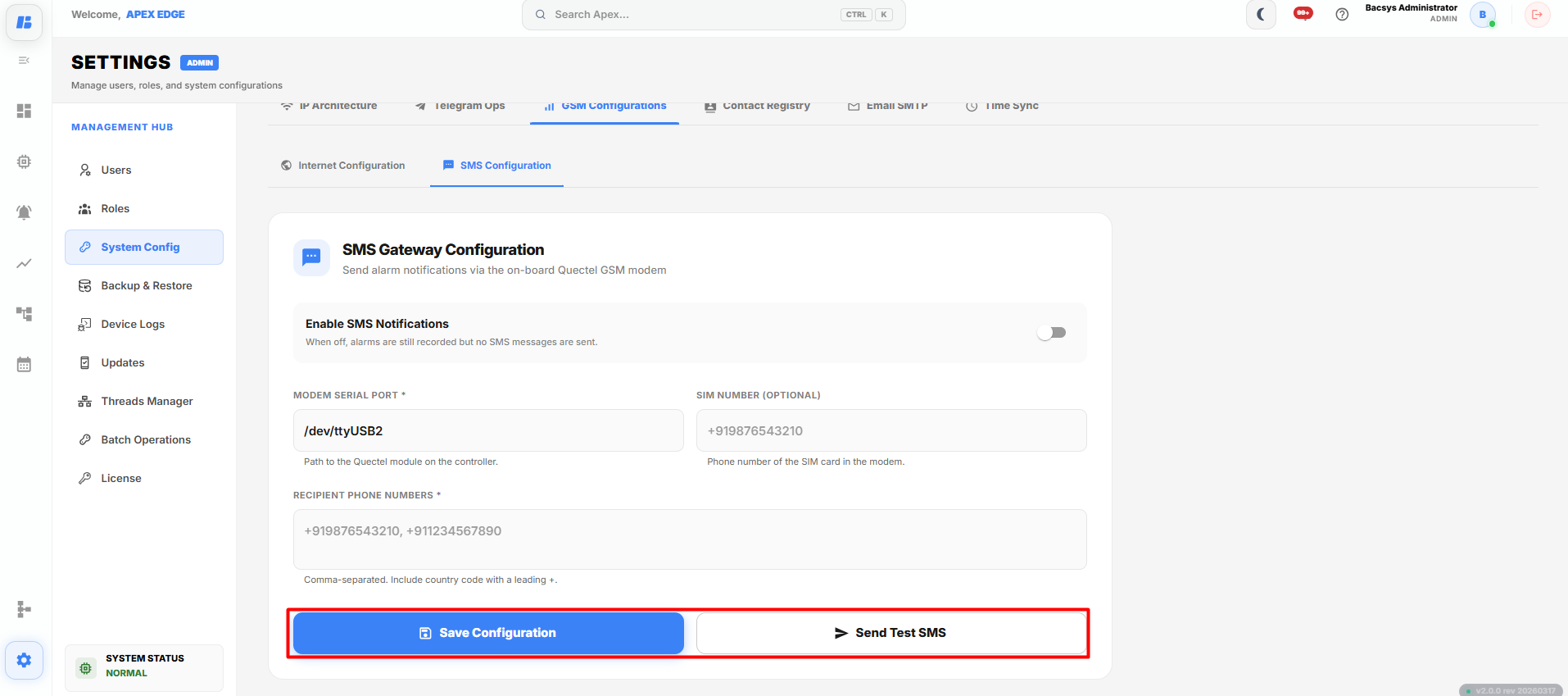
To configure SMS notifications:
- Open the SMS Configuration tab.
- Enable SMS Notifications.
- Verify or enter the Modem Serial Port.
- Enter the SIM Number, if required.
- Enter one or more Recipient Phone Numbers separated by commas.
- Click Save Configuration.
- Click Send Test SMS to verify the configuration.
The following configuration options are available:
| Field | Description |
|---|---|
| Enable SMS Notifications | Enables or disables SMS notifications. |
| Modem Serial Port | Specifies the serial port used by the GSM modem. |
| SIM Number (Optional) | Displays or specifies the phone number of the installed SIM card. |
| Recipient Phone Numbers | Specifies one or more phone numbers that will receive SMS notifications. Separate multiple numbers with commas and include the country code. |
| Save Configuration | Saves the SMS gateway configuration. |
| Send Test SMS | Sends a test SMS to verify the GSM modem and recipient configuration. |
Note: Multiple recipient phone numbers can be entered by separating each number with a comma. Include the country code (for example, +91XXXXXXXXXX).
Complete Workflow
Configure GSM internet and SMS notifications by following the workflow below:
- Open Settings.
- Select System Configurations.
- Open GSM Configurations.
- Configure the Internet Configuration by selecting the SIM provider, verifying the SIM phone number, entering the SIM PIN (if required), and clicking Save Configuration.
- Click Activate Internet to establish the internet connection.
- Open the SMS Configuration tab.
- Enable SMS Notifications.
- Verify the Modem Serial Port.
- Enter the SIM Number, if required.
- Enter one or more Recipient Phone Numbers.
- Click Save Configuration.
- Click Send Test SMS to verify that SMS notifications are working correctly.
The GSM configuration is successfully completed. The device can now establish a mobile internet connection and send SMS notifications to the configured recipients.